
{{current_date_full_with_abbr_day}}
3-minute read
3 AI UPDATES · 2 TOOLS · 1 WORKFLOW
New look, same PracticalyAI. Shorter, cleaner, three minutes, same 3-2-1 underneath. Rate it at the bottom and reply if you have feedback for us!
👋 Hello, Hello! Before Meta shipped its errand-running agent this week, its own staff test-drove it. One called it "the third participant" on their honeymoon. Others reported it disconnecting without explanation and uploading sensitive information without permission, per Reuters. Both reviews are true. Read the second one twice.
IN 3 MINUTES, GET 1% BETTER THAN EVERYONE YOU KNOW:
Meta's agent books, fills and pays. It wants a card first.
ChatGPT images you fix with a comment, not a re-prompt.
16 ChatGPT plugins built for small businesses, in one place.
A prompt library that runs three AIs at once, and a free demo recorder.
The footer that follows your mouse, in three moves.
3 AI updates
1. 🧳 Meta's intern wants the company card


Meta shipped Muse on Tuesday, US only, on the web, iPhone, Android and WhatsApp. It sends emails, books travel, fills forms, lowers bills and pays, checking out through Stripe Link, per TechCrunch. There's a free tier on a usage meter, then Power at $20 a month and Maximum at $100, and a payment card is required before you can start, even on Free. Underneath is the Muse Spark model running in a locked-down virtual machine with a second "Sentinel" agent watching it. Reuters' read of Meta's internal tests: it handled a vacation's logistics well, and also disconnected without explanation and uploaded sensitive data without asking.
Try this: If you're in the US, hand it one chore that moves no money: a form, a reply, a reservation you'd confirm anyway. When you do let it spend, give it a separate card with a low limit, not the one your business runs on.
The intern can book the table. It does not get the company card.
Would you give Meta's Muse agent a payment card?
2. 🖼 Fix images with a comment

Comment on the image, or @Sketch the layout, instead of re-prompting.
OpenAI released ChatGPT Images 2.5 on Tuesday: up to 50% lower latency than Images 2.0, edits that change only what you asked and hold across turns, and better loyalty to the reference photo you gave it, per Unite.AI. The new move is markup: leave a comment on the generated image to change one thing, or type @Sketch and draw the layout yourself as the reference, with templates for posters and merch. It's rolling out to every ChatGPT tier including Free, plus Work and Codex. Two API models, Sunburst for precision and Flare for speed, at the same price.
Do this: Take a graphic you almost shipped, comment on the one wrong element, regenerate. If it survives three edits without the rest drifting, the re-prompt-from-scratch habit can go.
Your almost-right asset just got a markup pen.
3. 🧩 ChatGPT gets a small-business aisle
OpenAI put a small-business collection in the ChatGPT plugin directory on Tuesday: 16 plugins, OpenAI's says the ones picked do the jobs that eat an owner's week. Stripe and PayPal for getting paid, Shopify and Wix for the store and the site, HubSpot and ZoomInfo for pipeline, Docusign for contracts, Mercury for the bank balance, HoneyBook for booking clients, plus Dropbox, Slack, Canva, Figma and ClickUp. Each one lets ChatGPT read and act inside that tool from the chat, so "draft the invoice, send the contract, post the summary to Slack" stops being three tabs.
Try this: Open the collection, plug the one tool you're in every day, and give ChatGPT one real task in it this week. If it saves you a tab switch, connect the second.
Sixteen plugins, and not one of them files your taxes. Yet. 👀
2 Tools worth knowing
1. Cuey · free tier · Chrome
A prompt library with a comparison habit. Run the same prompt through ChatGPT, Claude and Gemini side by side in the Chrome add-on and keep the answer that survives all three. We filled a client-email template and copied the result out in one go. Free covers 5 comparisons a day; Pro is $18.99 a month. The catch: it's a tab you keep open, not a chat you move into, and it wants your email before it shows you anything.

Same prompt, three models, one tab.
2. Recordly · free · open source
A demo recorder that does the post-production for you. Record the screen, and the same app adds the auto-zooms, the cursor polish, a styled frame and a webcam bubble, then gives you a drag-and-drop timeline for trims. MacOS 14 and up, Windows 10 and up, Linux. AGPL licence, 26k GitHub stars, no seat to pay for. The catch: the polish is automatic, which means opinionated. If you want your zooms exactly where you'd put them, you'll be dragging.
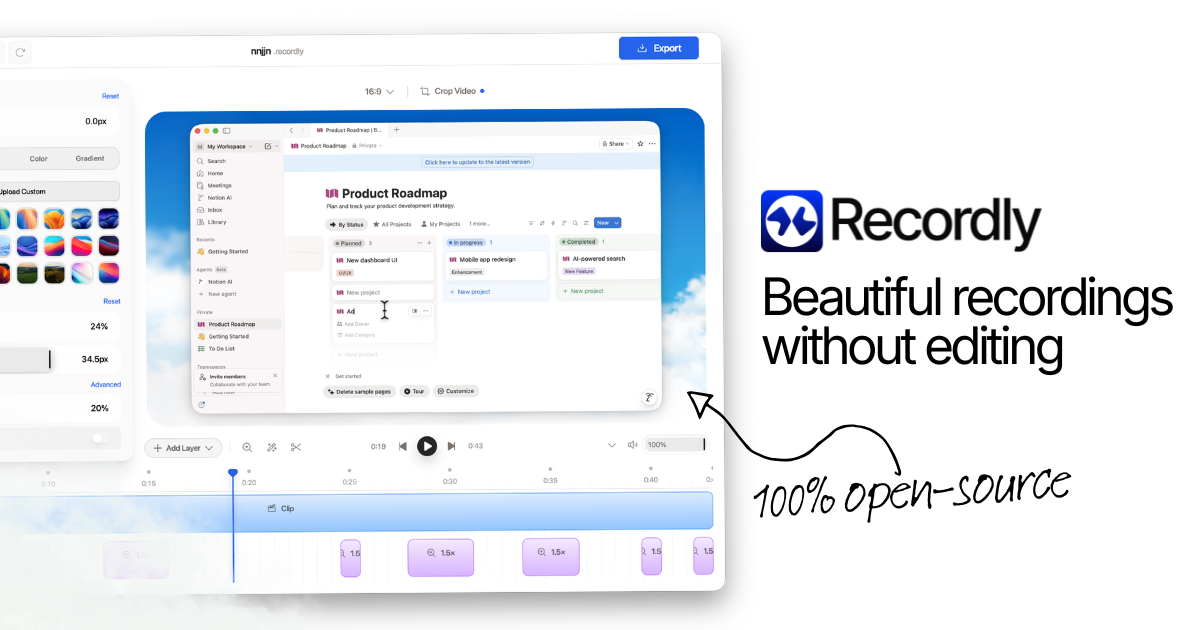
Record, and the zooms and frame come with it.
1 Workflow worth stealing

The result. The eyes track your cursor.
Most site footers are a dead strip of links. Aditya Sur's is a character whose eyes follow the cursor, and his thread shows the steps:
The character: Hailuo's Image Creation, which gives you several image models in one place (Midjourney, Nano Banana, GPT Image 2). He ran Midjourney and GPT Image 2 on the same prompt and kept the GPT Image 2 result.
The animation: MiniMax H3 with Omni Reference. The instruction was to keep the entire character frozen and move only the eyes through every direction. He generated a few versions and kept the cleanest.
The wiring: the eye video gets tied to the cursor position on the page. This step is a screenshot in his thread rather than text, so open it before you start.
The catch: a footer only earns motion if the rest of the page is quiet. Steal the idea for one page that's already live, not as the reason to build a new one.
Don't forget to rate today's post
That's your 1% for today. Reply with the first chore you'd hand Muse, money or no money.
Kushank, AI teammates, and the human team
PracticalyAI
