
{{current_date_full_with_abbr_day}}
3-minute read
3
AI UPDATES
2
WORKFLOWS
1
GUIDE
👋 Good morning.
On September 9, researchers uploaded 447 new machine-learning papers to arXiv in a single day, a record. Carnegie Mellon professor Zachary Lipton's response: CS academia broke the system, and maybe it has to burn to the ground to rebuild, per AI Weekly. Nobody has read all 447. Including, presumably, the 447 authors.
IN 3 MINUTES, GET 1% BETTER THAN EVERYONE YOU KNOW:
OpenAI rents out the engine behind Codex
Claude Code pops out onto your second monitor
Devin takes coding jobs by phone now
Paste a link, ChatGPT rebuilds the whole project
The Cancel List: score every subscription in 5 questions
3 AI updates
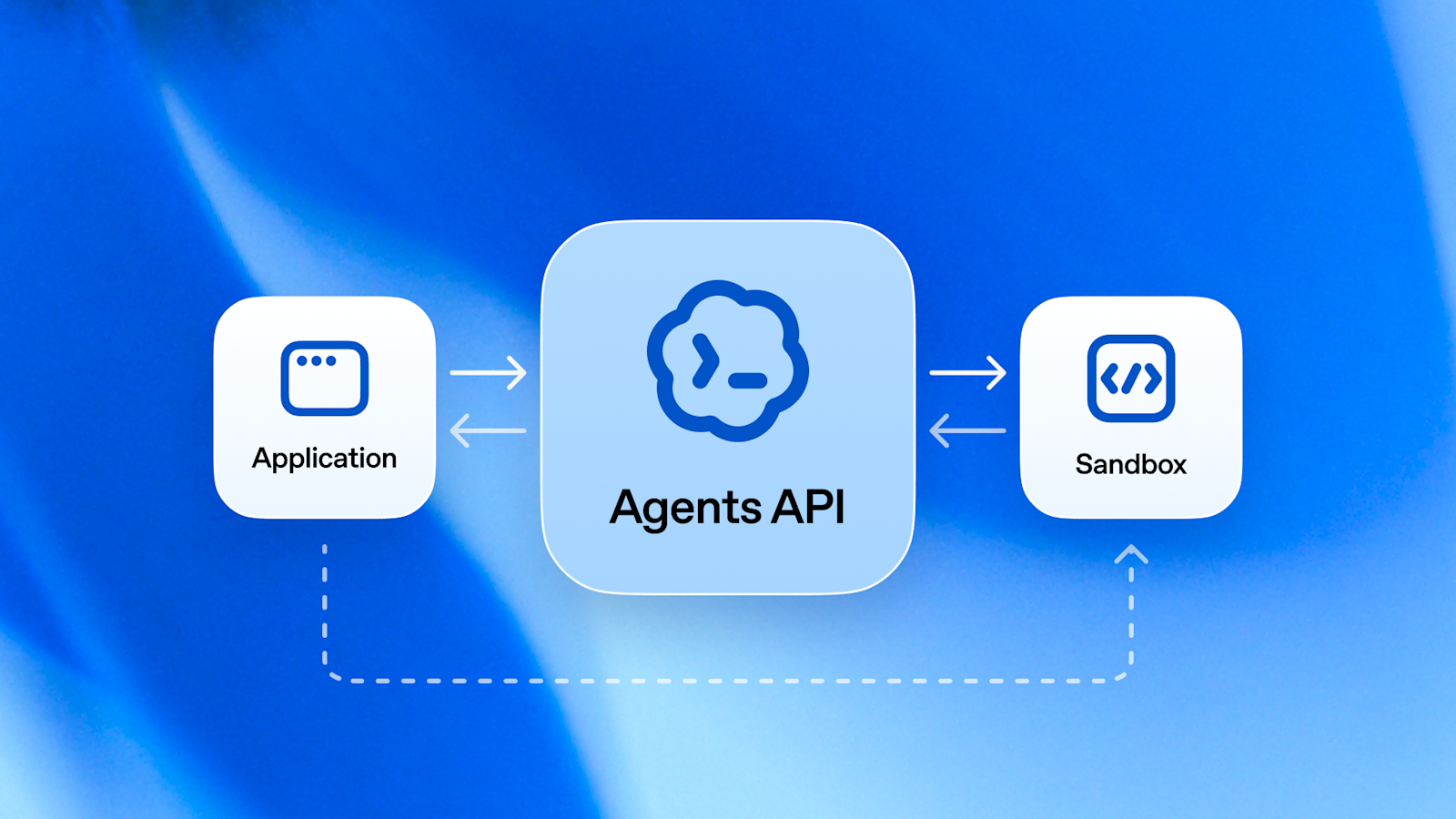
The Agents API went into public beta on Wednesday, per OpenAI. It is the machinery behind Codex, OpenAI's coding agent, offered as a managed service: long work sessions that keep their state, subagents that take side jobs, automatic tidying of the context window, and a sandbox where the agent can run code and edit files. The sandbox can sit on OpenAI's servers or on one of nine partner clouds, Cloudflare, Vercel and Oracle among them. There is no fee for the harness itself. You pay for tokens, tools, and the sandbox's container time. It is for teams wiring agents into products, not a new mode in ChatGPT.
Do this: If you already build on OpenAI's API, skim the Agents API overview once and pick the one multi-step job you keep hand-holding. That is the candidate for a sandbox.
Your agent finally has a desk, not just a chat box.
Would you hand a multi-step job to an agent running in the cloud?

Claude Code, Anthropic's coding agent, can now pop any pane in its desktop app into its own window, per Anthropic's developer account. Drag the diff or the terminal onto a second screen while Claude keeps working in the main window, then dock it back when you are done. Sessions can also run side by side or stacked, so two jobs fit on one screen without tab-hopping. Desktop app only. The terminal version stays a terminal.
Do this: If Claude Code desktop is already open, pop the diff pane onto your second monitor and leave the main session running.
Two monitors, one patient coworker.

Devin Voice lets you talk a coding job out loud and have Devin, Cognition's software agent, ship it. Hit the voice-call button next to the message box, allow the mic, and talk. It runs on OpenAI's GPT-Live plus Cognition's new SWE-2 model, which scores 50.0% on FrontierCode 1.1 Main against Fable 5.1's 50.9%, at 64% lower cost, per Cognition. SWE-2 is live in Devin Desktop and CLI now, with Web and Fusion rolling out. This is paid Devin, not a free chat toy.
Do this: If you already pay for Devin, dictate one small ticket by voice and check whether the handoff comes out clearer than what you would have typed.
50% on the bench, 64% less spend, and you can talk to it.
2 Things you didn't know you can do with AI
1. 🔗 Steal like an artist. Build like a dev. · Part 251

See a project you love online, like Maxime Rivest turning a reMarkable tablet into Tom Riddle's diary. Copy the post link. Paste it into ChatGPT with four words, "build this for me," and it rebuilds the project for you. Welcome to the fast fashion of the software era. The catch: you get the same project, not a better one, and it only works when the post shows enough of the build to copy.
2. 🧩 Ask ChatGPT for an exploded 3D model · Part 252

Want to understand how something works, a watch, a body, a car? Give ChatGPT the prompt from the reel and it builds an interactive 3D model you can pull apart piece by piece. The one Kushank ran:
"A mechanical wristwatch, with an exploded view of its major components and an animated demonstration of how the mainspring, gear train, escapement, and balance wheel work together to move the hands. Include a 'Follow the energy' mode that highlights each stage with a short, beginner-friendly explanation."
Swap the watch for whatever you sell. The catch: it wants a GPT-6 Astra-class model. If the prompt falls flat, hand your AI ashe's human-atlas repo and ask it to rebuild that for your object.
1 Guide

The Cancel List is our guide for freelancers, creators and small teams paying for a stack of tools that AI now half-covers.
This isn't about ditching every tool you own. It's about spotting the ones you're paying for that do one narrow thing your AI subscription already covers.
Five questions per subscription, each scored 0 to 2:
How narrow is the job it does? Narrow utilities are the easiest for AI to rebuild.
How much of it do you actually use? Pull logins, not memory.
Can an AI tool you already pay for reproduce the core output?
What breaks if you replace it?
How hard is switching back?
Add it up, then the verdict: cancel, downgrade, test first, or keep. Repeat every quarter.
The catch: the score is only as honest as your usage estimate. Open last month's charges, pick three line items, and run each one through the test before you trust the total.
Your stack just got a performance review.
Don't forget to rate today's post
That's your 1% for today. Reply with the first subscription you'd cancel.
Kushank, AI teammates, and the human team
PracticalyAI
