
👋 Hello hello,
We've got 3D objects appearing from thin air, your ChatGPT subscription becoming more useful, and OpenAI gave Codex pets. Yes. Pets.
Also your inbox situation? We're fixing that today.
Let's go. 🚀
📗 THIS WEEK’S 3 AI DROPS
ByteDance has released Seed3D 2.0, a model that can generate full 3D objects from either a single image or just a text prompt.
ByteDance's new model takes a single photo — or even just a text description — and generates a fully structured 3D object. You type "minimalist ceramic mug, matte white" and you get something a product designer could drop straight into a mockup.
Not just product mockups, also game assets, or even environment elements, without needing complex 3D modeling workflows. 3D has always been one of those “high skill barrier” areas. You needed tools, training, and time. This starts flattening that. If this works well in practice, it pulls 3D into the same category as images and video… something you can iterate on quickly.
We’re moving toward a world where “idea → asset” becomes just one step, not five.
Bonus: You can read their detailed tech report on 3D Content Generation here.
OpenClaw — an interface for running AI agents and workflows — now lets you authenticate directly with your existing ChatGPT account and use your subscription inside the platform. No new billing, no new credentials, no friction. You're already paying for GPT-4o. Now a third-party platform can just… ride that.
This is the OpenAI ecosystem strategy playing out in real time. If developers can build on your user base and your subscriptions, your model doesn't need to win — it just needs to be default.
But apparently, some users have already figured out how to use this combo:

Instead of OpenClaw acquiring its own users from scratch, it gets to borrow trust from a brand people already have a credit card relationship with.
The question this raises: how many other tools quietly become ChatGPT interfaces before OpenAI decides to build the same thing in-house?
Watch which apps adopt this pattern next. That list will tell you a lot about where the leverage sits.
Are people even using OpenClaw?
I’m sure you’ve heard of Codex by now. If you haven’t here’s a quick overview:
OpenAI added virtual pets to Codex. You summon them with /pet. You can customize them in settings. And it's a genuinely interesting design choice — wrapped inside a missed opportunity.
The idea is real: AI coding tools feel transactional. You prompt, it outputs, you move on. Personality layers — even small, cosmetic ones — change how people relate to a tool. They come back more. They feel less like they're operating a machine.
But OpenAI already had the perfect metaphor and walked right past it. Their own internal writing describes the agents running behind the scenes as "goblins" — chaotic, scrappy, doing invisible work. That's vivid. That's memorable. That's a mascot that actually maps to what the thing does.
Pets are warm and approachable. Goblins are accurate.
The counterpoint: maybe accurate isn't the point. Consumer products don't always win by being precise — they win by being likeable. Pets are safer. Still, next time you see a company name something that could've been named something better — that's a product decision worth interrogating.
🔥🔥 TWO AI TOOLS TO TRY TODAY
1. 🧠 NotebookLM (but with a twist)
You've probably heard of it. Google's AI workspace where you upload documents and it becomes your personal research assistant. Great for reports, papers, meeting notes. But people are using it for way more than that now.
Journals. Brain dumps. Half-baked ideas they can't make sense of. Turns out having an AI that only knows what you've told it is weirdly powerful.
So here's our question for you this week:
What's the one thing you use NotebookLM for that nobody else would expect?
Reply to this email or drop it in the comments👇.
The most interesting answers will be featured on our socials.
2. ⌚ Claude Cowork Email Skill
If you’re someone who handles a busy inbox, this simple workflow with Claude Cowork is about to save you at least an hour every day. And yes, we have tested this ourselves:
Here's how it works:
Step 1 — Teach Claude your style. Connect Gmail as a connector in Claude's desktop app. Ask it to analyze the emails you've sent over the last 30 days. It picks up your tone, your sentence structure, how formal or casual you are, and saves all of that as a "skill."
Step 2 — Set up the morning task. Using Claude's Co-work feature, schedule a task that runs each morning: read unread emails → ask clarifying questions if needed → draft a reply using the saved style skill.
Step 3 — Review and send. You wake up, open your inbox, and your drafts are already waiting. You read, tweak if needed, and hit send.
The part that makes this actually useful — and not just another AI email gimmick — is the style skill. It's not generating generic replies. It's drafting in your voice, based on how you actually write.
🔥🔥 THINGS YOU DIDN’T KNOW YOU COULD DO WITH AI
What good AI video actually looks like
If you thought AI videos were just for editors and filmmakers, think again.
This realtor in Arizona used AI to create a super fun video. The video shows her falling out of a plane… and landing on the property she’s about to show to her followers. Sounds ridiculous. But it works.
And because the hook is so strong, the transition into the actual tour is clean, and the editing doesn’t feel like AI spam. It feels like a story.
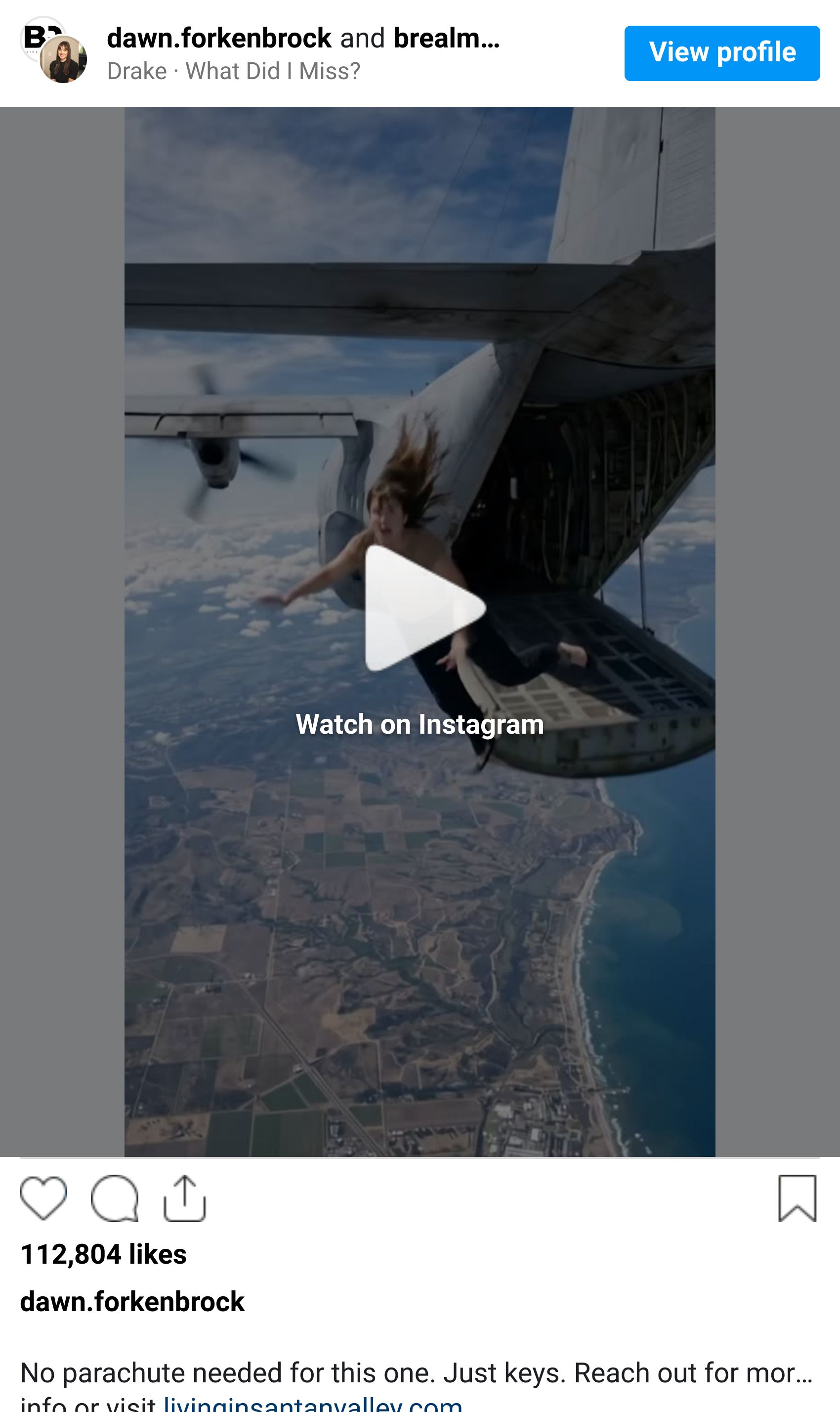
This is the difference most people miss. AI is not the idea. It’s the amplifier.
If the concept is weak, AI just makes it louder.
If the concept is strong, AI makes it unforgettable.
Do you like this new format?

💬 Quick note: We’re building something to help teams truly get good at AI |
